What are the NSF’s Data Sharing Policy Requirements?
NSF’s policy on public access to research products includes the following data- and code-related requirements.*
- Investigators are expected to publicly share at no more than incremental cost and within a reasonable time, the primary data, samples, physical collections, software, inventions, curriculum material, and other supporting materials created or gathered in the course of work under NSF awards.
- Scientific datasets underlying peer-reviewed scholarly publications resulting from federally funded research should be made publicly available at the time of publication per the associated award’s Data Management and Sharing Plan (DMSP). Exceptions must be described and justified within the DMSP.
- Researchers are encouraged to deposit datasets in online repositories which assign them a Persistent Identifier (PID).
- Datasets should possess a minimum set of descriptive metadata elements, as specified in the annual project reporting requirements.
- Privileged or confidential information should be released only in a form that protects the privacy of individuals and subjects involved.
The DMSP is reviewed as an “integral” part of the proposal, considered under Intellectual Merit or Broader Impacts or both (see criteria described in the Grant Proposal Guide III.A.2).
NOTE: As of April 27, 2026, per changes announced in the 2026 PAPPG 24-1 Supplement 2, the Data Management and Sharing Plan format for proposals changed from a PDF document to a webform on the Research.gov site.
More information is available on the NSF website, including their FAQ pages.
Want help?
- Reach out to CDS for a free consultation and review of your DMSP
- Use the DMPTool to draft your responses before working in Research.gov
*For information on publication-related requirements of the NSF Public Access Policy, please see resources on the Research Services website.
What should be included in a Data Management and Sharing Plan (DMSP)?
Data management and sharing requirements may be specific to NSF units, divisions or proposals. If no specific unit guidance is available, then follow guidance provided in the PAPPG, Chapter II.D.2.(i).(ii). The DMSP should describe whether and how data generated in the course of the proposed research will be shared, documented and preserved.
If the project will not produce data or research products, or for another reason that will require a justification, a box can be checked indicating that a DMSP is not needed.
Generally, the NSF DMSP includes the same major areas covered in other agency data plans.
Specifically, the DMSP form on Resarch.gov includes the following sections:
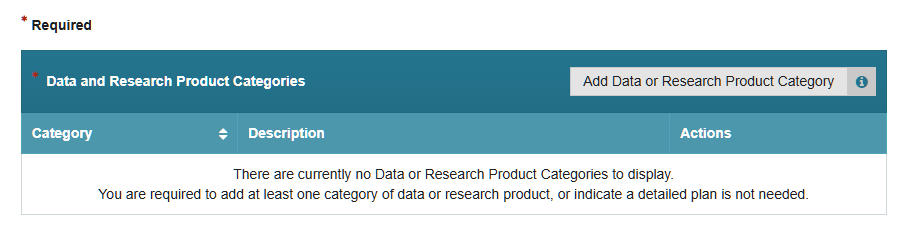
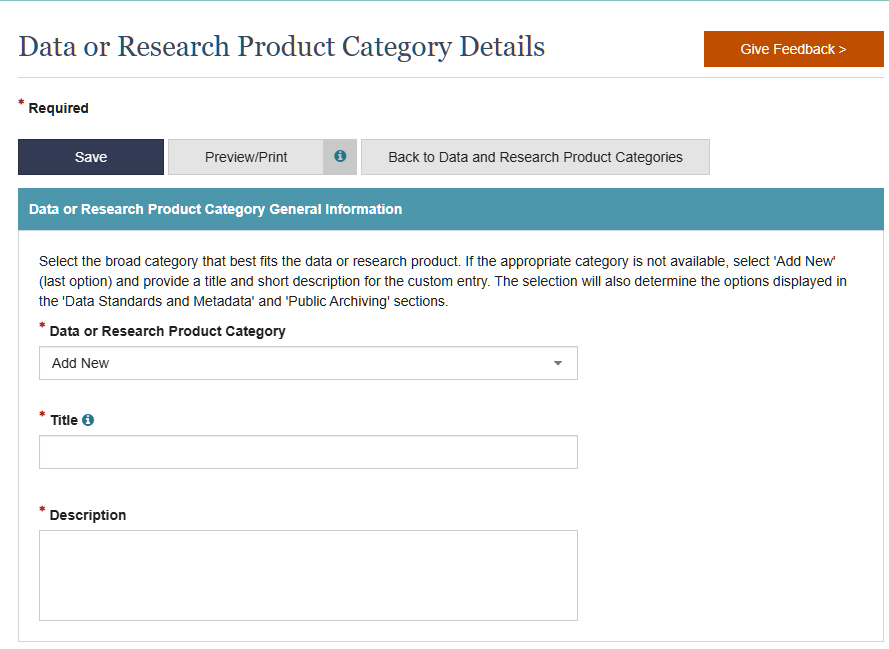
Data or Research Product Category
Describe the high level organizational categories for your data or other type of research products. Data categories may incorporate several different types of data that are all aligned; a separate entry is not needed for each planned dataset.
Note that all remaining DMSP sections are tied to your chosen data category and you will likely need to enter multiple (up to FOUR) categories to complete the form.
- Most proposals will need to use “Add New” button and create a title and description for each data or research product type.
- Directorates can provide pre-filled categories in a drop-down box. If selected, these can pre-determine options in other sections (e.g. for standards and sharing methods).
Access Policies and Limitations
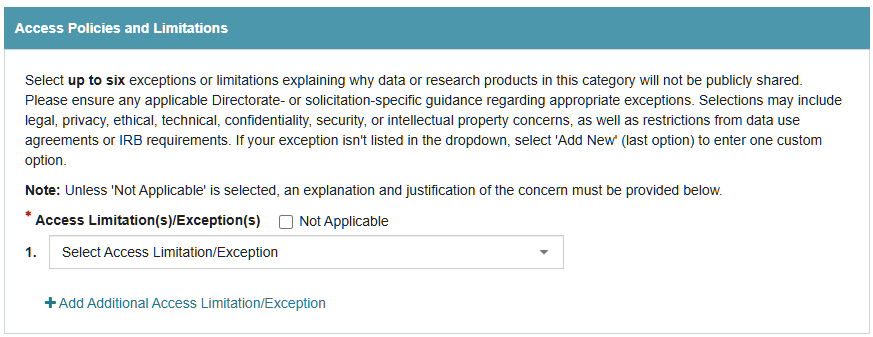
Select up to six exceptions or limitations that explain why the data in this category cannot be publicly shared. There are pre-filled selections to choose from that cover most situations but you may also add your own. Make sure to ensure any applicable Directorate- or solicitation-specific guidance regarding appropriate exceptions are followed.
- Select Not Applicable if there are no exceptions or limitations to making the data publicly available.
- A written justification is required in addition to selecting from the drop-down menu.
- Some directorates include pre-populated limitations/exceptions, such as:
- Data Sovereignty
- Data Use Concerns
- Human Data Protection
- Legal Considerations
- National Competitiveness
- Natural Resource Protection
- Resource Limitations
Data Standards and Metadata
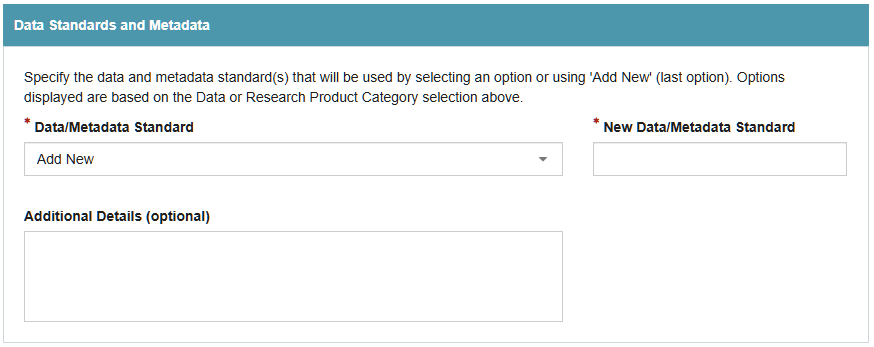
Describe the formats of your data (i.e., file type) and metadata standards (organization) associated with the chosen data category. Prioritize standards that support the interoperability or interpretability of data by choosing open, non-proprietary file types (whenever possible) and specify existing standards when they exist.
- Some directorates may have pre-populated standards but most proposals will need to use “Add New” button to enter information about their standards and metadata.
- Only one entry is allowed per category. If multiple file formats are being used use the ‘Add New’ option and then provide details on all formats for that category in the ‘Additional Detail’ box.
- Note that after typing a standard into the “New Data/Metadata Standard” box, there is no “save” or “enter” needed before you move to the next section. The “Save” and “Preview/Print” buttons are at the bottom of the page, and are for the entire form.
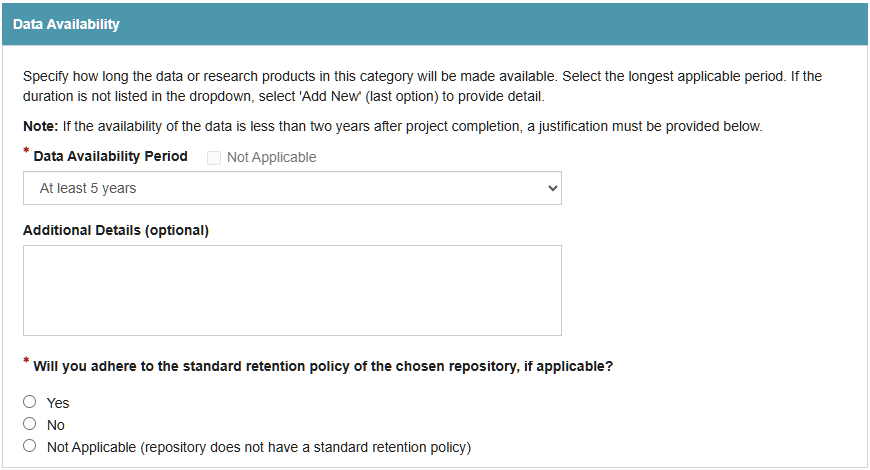
Data or Research Product Provenance
Enter details about the source of the data and research products in this category (e.g., new, or pre-existing,).
- Data Source options can include:
- Existing Data Resource
- Existing Dataset
- New Data Collection
- Add New
- “Existing Data Resource” and “Existing Dataset” require a free-text name for the preexisting resource/dataset.
- Only one entry is allowed per category. If multiple pre-existing resources/datasets are being used for a category, then use the ‘Add New’ option and provide details on each in the ‘Additional Detail’ box.
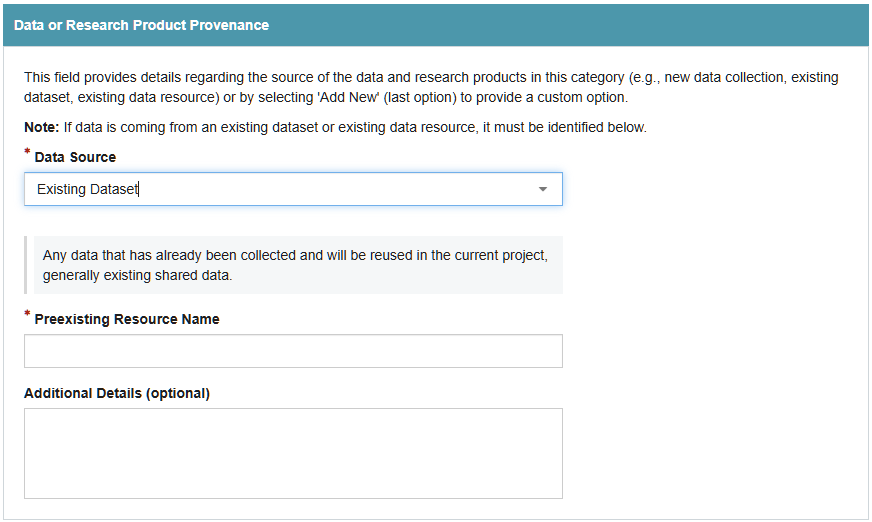
Public Archiving
Specify where a data or research product will be made publicly available. For most categories, this will be online data repository.
- Most proposals will need to use “Add New” button but some directorates have pre-filled selections to choose from and may even suggest a repository if using a pre-filled category type.
- Only one entry is allowed per category. If multiple repositories will be used use the ‘Add New’ option, enter the “New Data Sharing Location” and provide details on each repository in the ‘Additional Details’ box.
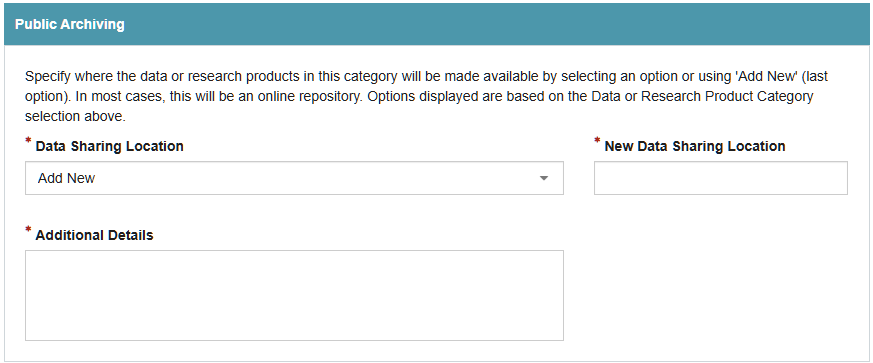
Timeline for Public Accessibility
Provide the anticipated timeline by which this data or research products in this category will be shared, or select ‘Not Applicable’ if it will not be shared.
- Remember that you are required to share all data supporting NSF funded publications at the time of publication** unless there is a justifiable exception which should be detailed in the ‘Access Policies and Limitations’ section.
- Only one entry is allowed per category. Use the ‘Add New’ if your public access timeline is complex, includes multiple timelines, or otherwise does not fit the pre-filled options.
- Timeline options in the dropdown menu may include
- At time of collection
- At time of publication**
- Less than 6 months after publication
- Less than 1 year after publication
- Within 2 years after collection
- By the end of the award
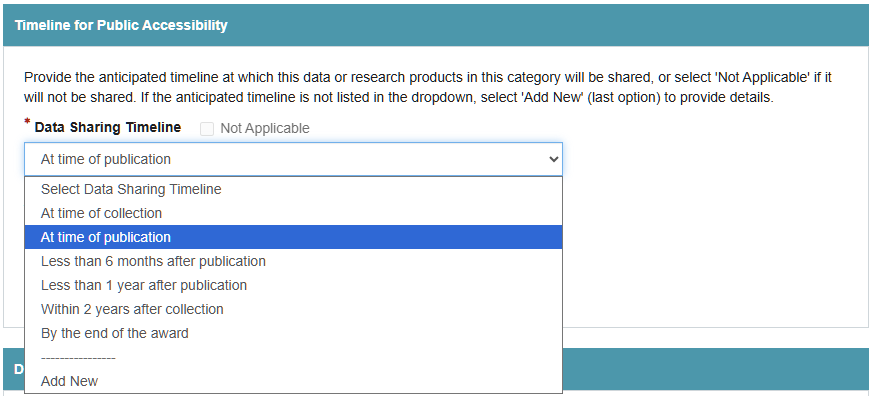
Data Availability
Provide information about the duration for which data or research products associated with the chosen category will be made available. In many cases, the retention duration will be determined by the policies of the repository.
- If the availability of the data is less than two years after project completion, a justification must be provided.
- Only one entry is allowed per category. Users are prompted to select the longest applicable period for the data in that category.
- Use the ‘Add New’ if your data availability plans or complex and/or don’t fit the pre-filled options.
- A required Yes/No/NA question asks if you will “adhere to the standard retention policy of the chosen repository, if applicable?”.
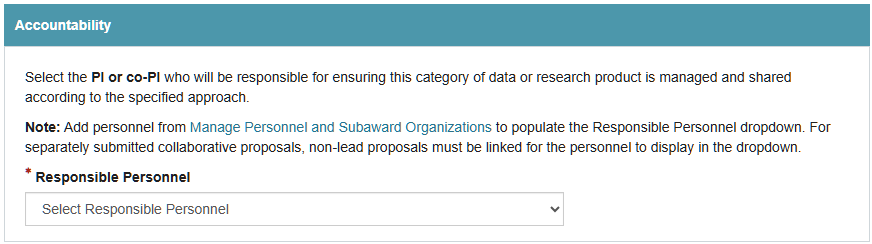
Accountability
Indicate which PI or co-PI will be responsible for the ensuring the chosen category of data or research product is managed and shared according to the approach specified through the form.
- The drop down box options are limited to PIs and Co-PIs (Senior Personnel) entered into the proposal.
- For separately submitted collaborative proposals, non-lead proposals must be linked for the personnel to display in the dropdown.
How does the “new” form compare to the “old” guidance?
| Research.gov form Section | Previous DMP Guidance Component |
| Data or research product category | Data Types |
| Access Policies and Limitations | Reuse and Licensing |
| Data Standards and Metadata | Data Types and Documentation |
| Data or Research Product Provenance | Documentation |
| Public Archiving | Storage and Backup |
| Timeline for Public Accessibility | Preservation |
| Data Availability | Preservation |
| Accountability | Roles and Responsibilities |
| Not in new form – costs covered and justified in proposal budget | Costs |
Where can I deposit my data?
There is currently no designated NSF repository for data.
Deposit into recognized, accessible, community-accepted repositories is increasingly emphasized, and it is important to consult the Requirements by Directorate, Office, Division, Program, or other NSF Unit for more specific instructions. Whether or not specific guidance is provided, researchers should discuss their plan for preservation of access to data resulting from the project in their DMSP.
See our guidance on sharing and archiving data for information about finding a suitable repository.
How do I submit data to a repository?
Before submitting your data to your chosen repository, you will need to ensure you’ve completed these steps.
- De-identify your data if appropriate.
- Put your data in an open, machine-readable file format such as .csv.
- Document the dataset thoroughly in a separate readme.txt file, and/or create metadata according to the scheme required by your chosen repository.
- Obtain a DOI or other permanent identifier for the dataset from your chosen repository.
- Follow the upload instructions for your chosen repository.
Are there any compliance requirements?
- Research proposals without a DMSP will not be considered for funding.
- Failure to deposit data may negatively influence future funding opportunities.
- Failure to provide updates in grant reporting may result in withholding or adjustment of funds at the end of each performance period.
How to get help
- Reach out to CDS for a free consultation and review of your DMSP
- Use the DMPTool to draft your responses before working in Research.gov
Material on this page was inspired by and modified from:
- O’Donnell, Megan. Data management and sharing plan guide. Iowa State University, University Library. 2026-09-01. https://instr.iastate.libguides.com/dmsp/nsf-form.
- Gonzalez-Espinosa, Alfredo. Data Management for Research: Data Management and Sharing Plans for Federal funded research. Carnegie Mellon University. 2026-09-01. https://guides.library.cmu.edu/researchdatamanagement
Page last updated September 2026